How to create Custom FastPicks filters
Expected read time: 12 min
FastPicks are custom live match scanners. Instead of opening every fixture and trying to remember what to look for, you describe the match situation once, save it, and let PitchPressure surface matches that match your conditions.
The new builder starts with six useful templates and has both Simple and Advanced editing. The best filters still stay focused: a time range, one pressure idea and one or two confirmation stats.
In short
A FastPick is a saved set of conditions that finds live matches fitting your chosen situation. Start with a simple rule, review the matching fixtures and enable alerts only when the filter behaves as expected.
On this page
What FastPicks are
A FastPick is a saved filter that checks live fixtures against a set of conditions. When a match passes those conditions, it can appear in your FastPicks strip and, if alerts are enabled, send a notification.
Think of it as a live match watchlist that updates itself. You can create filters for first-half 0-0 pressure, late corner pressure, away counter signals, red-card game states, recent shots on target, pressure increases, or calmer sustained pressure patterns.
FastPicks are not predictions. They are a way to find matches that fit a live statistical situation. You still review the match chart, event markers, score, goal timing and pre-match context before deciding what to do with the information.
Start with a template, then make it yours
Open FastPicks → Builder. A new filter begins with six editable starting points: Goal Before 80′, First-Half Goal Watch, Early Goal Pressure, Sustained Goal Pressure, Next Corner Pressure and More Yellow Cards. Selecting one copies its conditions into your builder; it does not activate anything until you save it.
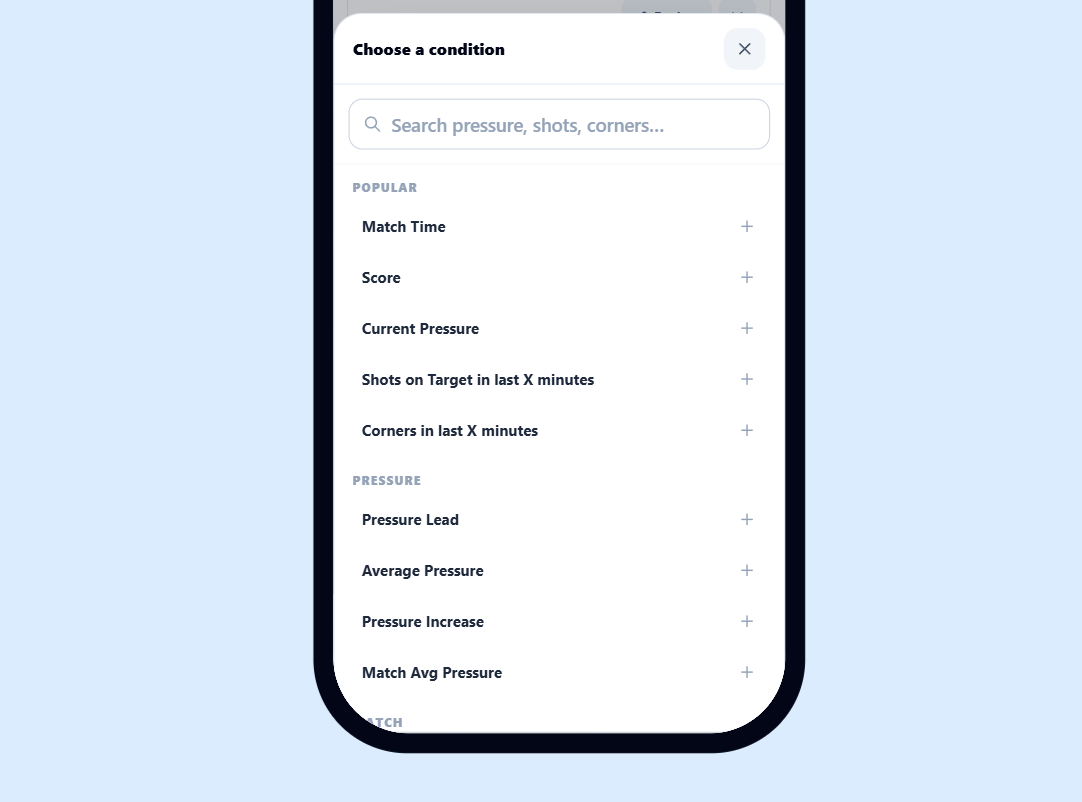
Simple mode is the recommended editor. Add conditions through the category picker, keep required rules under “All of these must happen”, and use the optional OR section for alternative routes. Advanced mode shows the same filter as compact rows for quicker editing. Switching modes does not change the underlying conditions.
The “Your FastPick” panel translates the setup into readable rules. Check that summary, give the filter a clear name, save it, activate it in My Filters and enable alerts only after observing its live results. If a rule returns nothing, review its conditions and the available match data before adding more conditions.
The condition model
Every row in the builder is a condition. Most rows follow the same structure: group, metric, operator, value, team scope and sometimes a Last X minutes window.
In plain English: show matches where the current pressure-leading side averaged more than 40 pressure over the last 10 minutes. Other team conditions stay attached to its opponent.
Fields you can actually use
These are the fields currently available in the FastPicks builder. The most important decision is not which metric is most advanced; it is which metric best describes the match situation you want to catch.
Match State
Match Time
Limits the filter to a minute range. Use it as the first rule in almost every filter so the setup only scans the part of the match you care about.
Pressure
Current Pressure %
The pressure value right now for the selected team scope. Useful for immediate momentum.
Pressure Lead %
How much one team is out-pressuring the opponent right now. This is useful when you do not only want high pressure, but a clear pressure gap.
Average Pressure %
Average pressure over the selected last X minutes. This is usually calmer than Current Pressure % because it looks for sustained pressure.
Pressure Increase %
Current pressure minus pressure at the start of the selected window. Useful for sudden surges.
Match Avg Pressure %
Average pressure over all available match minutes so far. Useful when a match has been consistently one-sided.
Score
Goals
Current goals for the selected team scope. Use Match Total = 0 for 0-0 filters, Match Total >= 1 for matches with at least one goal, or a team scope for one side.
Score at Half Time
Half-time goals for the selected team scope. Match Total = 0 means a 0-0 half-time score. For another exact score, add separate Home only and Away only conditions. This condition only becomes active from half time onward.
Goal Difference
Score lead or absolute score gap depending on team scope. Useful for finding teams chasing, protecting a lead, or matches that are still close.
Current Stats
Possession %
Current possession percentage. Best used with Home only, Away only or Higher team value.
Shots
Shots on target plus shots off target. Good for activity, but less strict than shots on target.
Shots on Target
Only shots on target. Stronger confirmation that pressure is turning into dangerous chances.
Attacks
Total attacks for the selected team scope. Can be useful for volume, but usually needs pressure or shots beside it.
Dangerous Attacks
Dangerous attacks for the selected team scope. Useful as a supporting rule, especially in lower-data matches.
Corners
Current corner count. Often useful in pressure and late push filters.
Yellow Cards
Current yellow card count. Useful for card-heavy or emotional match states.
Red Cards
Current red card count. Useful for matches that changed shape after a sending off.
Last X Minutes
Shots in Window
Shots created in the selected last X minutes. Strong for recent momentum.
Pressure in Window
Requires the selected team to meet the pressure threshold in every real minute of the window. This deliberately filters out one-minute spikes and will not trigger on an incomplete window.
SOT in Window
Shots on target in the selected last X minutes. Very useful for live alert filters because it confirms recent danger.
Corners in Window
Corners won in the selected last X minutes. Good for repeated pressure.
Goals in Window
Goals scored in the selected last X minutes. Useful for response, late drama or goal-after-goal style monitoring.
Yellow Cards in Window
Yellow cards in the selected last X minutes. Useful when match temperature changes quickly.
Red Cards in Window
Red cards in the selected last X minutes. Useful for alerting after the match state changes.
Team scopes
Team scope decides which side the condition checks. Getting this right is often more important than the exact number you choose.
Pressure-leading team
Locks every team-specific condition to the side that currently has the higher pressure. Use this when pressure, shots and recent activity must all belong to the same team.
Other team
Checks the opponent of the pressure-leading team. Combine it with Pressure-leading team to describe one-sided match states without separate home and away filters.
Higher team value
Uses the higher home or away value separately for each metric. The team may therefore differ from one condition to the next. Use it when only the highest value matters, not which side produced every value.
Home only
Only checks the home team. Use this when your strategy specifically depends on the home side.
Away only
Only checks the away team. Use this when your strategy specifically depends on the away side.
Lower team value
Uses the lower value between both teams. This is useful for both-teams-active filters, because the weaker side must also clear the threshold.
Match Total
Adds home and away together. Use it for goals, corners, cards and total match activity.
Operators and Last X minutes windows
Operators compare the live value against your number. Window fields add one extra choice: how many recent minutes should PitchPressure inspect.
More than the value. Example: Pressure % > 65.
At least the value. Example: Shots OT >= 2.
Less than the value. Example: Goals < 1.
At most the value. Example: Goals <= 2.
Exactly the value. Example: Goals = 0.
How to choose a window
Short windows such as 5 minutes react quickly but can be noisy. Medium windows such as 10 or 15 minutes are usually better for alerts. For Pressure in Window, every real minute in the complete window must meet the threshold; it is stricter than Average Pressure and intentionally ignores short spikes.
Must match vs Any trigger
This is the most important advanced feature in the builder.
Must match
Required rules. Every Must match row must be true before the match can pass. Use these for your base setup: time, score state and pressure.
Any trigger
Alternative trigger rules. If you add Any trigger rows, at least one of them must be true. Use this when several different signals can confirm the same idea.
Build a filter step by step
- 1. Choose a starting point. Pick one of the six templates or choose Start from scratch. Templates are editable examples, not fixed strategies.
- 2. Add Match Time. Decide when the setup may trigger. Use the range that belongs to the market or match phase you want to watch.
- 3. Add the score state. Use Goals, Goal Difference or Score at Half Time only when that match state is essential to the idea.
- 4. Choose the pressure behavior. Current Pressure catches the moment, Average Pressure measures the window average, and Pressure in Window requires every complete minute to pass.
- 5. Keep the team consistent. Choose Pressure-leading team for the dominant side and Other team for its opponent. Use Higher team value only when each metric may select a different side.
- 6. Add one confirmation. Recent shots, shots on target or corners often explain whether pressure is producing actual events.
- 7. Read the preview, name and save. Verify “Your FastPick”, save it, activate it in My Filters and observe live triggers before enabling alerts.
Starter filters you can adapt
These examples use fields that exist in the current builder. Treat them as starting points, not universal settings for every league.
Goal Before 80′
A strict one-sided setup with sustained pressure, recent shots and no goal in the previous 15 minutes.
- Must match: Match Time between 10 and 75
- Must match: Average Pressure % > 30 (Pressure-leading team, last 10 minutes)
- Must match: Goals in Window = 0 (Match Total, last 15 minutes)
- Must match: Shots in Window > 3 (Pressure-leading team, last 10 minutes)
- Must match: Average Pressure % < 15 (Other team, last 15 minutes)
- Must match: Pressure in Window >= 40 (Pressure-leading team, last 10 minutes)
- Must match: Pressure in Window <= 15 (Other team, last 10 minutes)
Pressure in Window is intentionally strict: every real minute in the full window must pass. Lower the window or threshold if this setup is too rare.
First-Half Goal Watch
Find a close first half in which the same pressure-leading team also created a recent shot on target.
- Must match: Match Time between 20 and 38
- Must match: Goal Difference <= 1 (Match Total)
- Must match: Average Pressure % >= 30 (Pressure-leading team, last 10 minutes)
- Must match: SOT in Window >= 1 (Pressure-leading team, last 10 minutes)
Use this as a first-half goal watch, not a prediction. Raising average pressure gives fewer but stronger signals.
Early Goal Pressure
Find the pressure-leading team between minute 20 and 60, leaving time to watch that team score before minute 80 or select an earlier market.
- Must match: Match Time between 20 and 60
- Must match: Goal Difference <= 1 (Match Total)
- Must match: Average Pressure % >= 30 (Pressure-leading team, last 10 minutes)
- Must match: Shots in Window >= 3 (Pressure-leading team, last 10 minutes)
If the goal-before-80 price is too short, the same signal can be reviewed against an earlier team-goal deadline.
Sustained Goal Pressure
A later goal watch for a pressure-leading team that is sustaining momentum and producing shots on target.
- Must match: Match Time between 60 and 80
- Must match: Average Pressure % >= 35 (Pressure-leading team, last 10 minutes)
- Must match: SOT in Window >= 1 (Pressure-leading team, last 10 minutes)
Add a score or goal-difference condition if your use case only makes sense in close matches.
Next Corner Pressure
Find a clearly dominant pressure side with recent shooting activity for a next-corner watch.
- Must match: Match Time between 20 and 75
- Must match: Current Pressure % >= 60 (Pressure-leading team)
- Must match: Current Pressure % <= 20 (Other team)
- Must match: Shots in Window >= 3 (Pressure-leading team, last 10 minutes)
Pressure-leading team and Other team keep both pressure thresholds attached to the same matchup direction.
More Yellow Cards
Find close matches that already contain several cards and may produce another late booking.
- Must match: Match Time between 60 and 80
- Must match: Goal Difference <= 1 (Match Total)
- Must match: Yellow Cards >= 3 (Match Total)
Cards are competition- and referee-dependent. Review the live context rather than treating the count as a guarantee.
Alerts and notifications
A saved FastPick can become more than a scanner. When Push, Telegram or Discord alerts are enabled, PitchPressure can notify you when a live fixture matches the filter.
Alerts work best when the filter is specific enough that every notification deserves attention. A broad filter such as Pressure % > 50 can fire too often. A focused filter such as Match Time 70-90, Goals <= 2, Average Pressure > 45 and SOT in Window >= 1 is usually more useful.
Use alerts for workflows you have already tested manually. Create the filter, leave it visible in the FastPicks strip, watch a few match days, then enable your preferred channels once the signal feels right.
Alert checklist
- Use Match Time so alerts do not fire during the wrong phase.
- Add at least one confirmation stat such as SOT in Window or Corners in Window.
- Avoid alerting on very broad pressure-only filters.
- Keep the filter name short enough to understand inside the notification.
- Review triggered matches occasionally so you know whether the setup is still useful.
Best practices
- Start with Match Time. Most noisy filters become much better when they only run during the right match phase.
- Use one pressure idea and one confirmation idea. For example: Average Pressure plus SOT in Window. Avoid stacking six pressure conditions that all say almost the same thing.
- Use Current Pressure % for sharp live moments and Average Pressure for sustained momentum.
- Use Pressure Increase when you care about a change in match flow, not only the current level.
- Use Pressure-leading team when all conditions must follow one side. Use Higher team value only when each metric may independently choose the higher side.
- Use Any trigger rows when several different events can confirm the same setup. Example: recent SOT OR recent corners.
- Test before alerts. A filter that looks good in the builder may still be too noisy during a busy match day.
- Change one threshold at a time. If you change time, pressure and shots together, you will not know which change improved the filter.
- Keep names practical. You should understand the filter from the FastPicks strip without opening the builder.
- Do not copy a filter blindly across every league. Lower leagues and high-tempo leagues can produce very different pressure and shot patterns.
Troubleshooting
No matches are showing
The filter is probably too strict. Temporarily remove the last condition, widen the Match Time range, or lower one threshold. Also check that the selected country/league sidebar filters are not hiding matches.
Too many matches are showing
Add one confirmation rule. Good options are SOT in Window, Corners in Window, Shots, Goals = 0, or a narrower Match Time range.
Alerts feel late
Use Current Pressure % or Pressure Increase for faster signals. Average Pressure is more stable, but it needs a few minutes of data to build.
Alerts feel random
Add Recent/Average Pressure or a Last X Minutes stat. One single current stat can spike for a moment and then disappear.
A Last X Minutes rule does not trigger as expected
Window rules depend on available live event and stats history. Use them with a simple pressure rule so the filter still represents the match flow.
Home and away logic feels wrong
Check the team scope. Pressure-leading team and Other team stay paired to one side; Higher team value recalculates the higher side per metric; Home only and Away only are fixed sides.
FastPicks FAQ
What is a Custom FastPicks filter?+
A Custom FastPicks filter is a saved group of live match conditions. PitchPressure checks live fixtures against those conditions and shows matching games in your FastPicks strip. If alerts are enabled, the same saved filter can trigger Push, Telegram and Discord notifications depending on your settings.
What changed in the new FastPicks builder?+
The builder now opens with six practical templates, offers Simple and Advanced editing, groups required and alternative conditions clearly, previews the filter in plain English, and supports Pressure in Window plus paired Pressure-leading team and Other team scopes.
What is the difference between Pressure-leading team and Higher team value?+
Pressure-leading team identifies one side from the live pressure and keeps every team-specific rule attached to that side. Higher team value chooses the higher side again for each individual metric, so pressure could come from one team while shots come from the other.
What is the difference between Must match and Any trigger?+
Must match rows are required. Every Must match row must be true. Any trigger rows are optional alternatives: when you add Any trigger rows, at least one of them must be true after the required rows pass.
What does Higher team value mean?+
Higher team value checks whichever side has the higher value for the selected metric. For example, Current Pressure % > 60 with Higher team value means either home or away can pass if that side is above 60.
What does Lower team value mean?+
Lower team value checks the lower value between both teams. This is useful when both teams must have activity. Shots >= 3 with Lower team value means the lower-shot team must still have at least 3 shots.
When should I use Match Total?+
Use Match Total for combined match values such as total goals, total corners, total cards or total recent events. It is usually not the right scope for possession or pressure-based ideas.
Can I filter exact scores?+
You can filter the current score with Goals and the half-time score with Score at Half Time. For a 0-0 half-time score, use Score at Half Time = 0 with Match Total. For another exact score, add separate Home only and Away only conditions. Add Goals = 0 with Match Total if the current score must still be 0-0.
Can FastPicks trigger before a match starts?+
No. FastPicks are designed for live playable matches. Upcoming fixtures should not trigger FastPicks alerts because the conditions depend on live match state and live stats.
Can FastPicks send Push, Telegram and Discord alerts?+
Yes. Saved custom FastPicks can send alerts through every connected channel when alerts are enabled on that filter. Use alerts only for filters you have tested, otherwise a busy match day can become noisy.
Should I use Current Pressure % or Average Pressure?+
Use Current Pressure % when you want fast live spikes. Use Average Pressure when you want sustained pressure over a selected window. Many good filters use both: one for current intensity and one for stability.
Help guide details
- Published
- 21 May 2026
- Last edited
- 21 September 2026